
Restaurant Queuing System Recommendation | eRunlite Smart Queuing Solution – Zero-Hassle, Fully Integrated
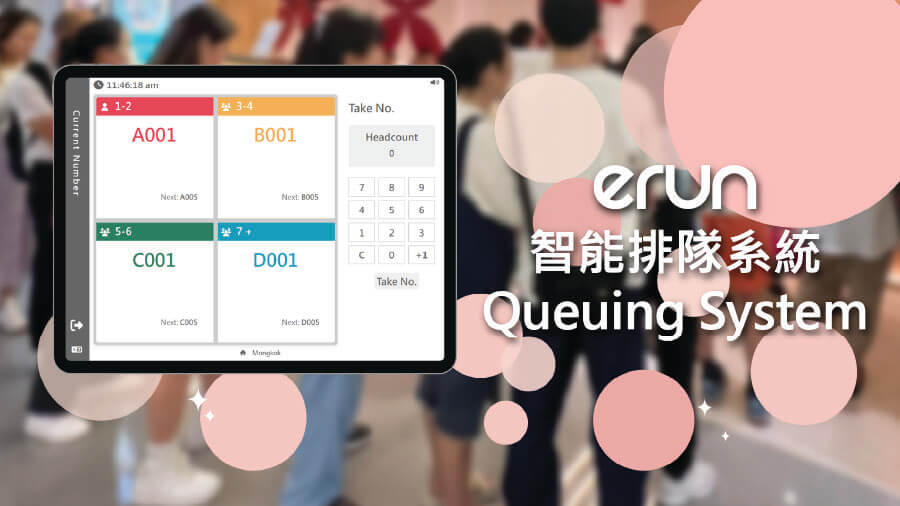
Long queues at your restaurant entrance, impatient customers constantly asking “How much longer?”, and staff frantically handing out paper tickets while worrying about missed call-outs? Traditional manual queuing is not only chaotic and error-prone—more importantly, it damages the customer experience and sends potential business out the door.
The Smart Queuing System is an add-on module for eRunlite POS—no need to replace your existing system, just install and go. It uses smart technology to transform the waiting experience, offering a one-stop solution for ticket issuing, queue management, and table calling. Whether you run a local tea restaurant, a banquet hall, or a fast-food chain, this module integrates seamlessly into your current operations. Say goodbye to frustrated waiting customers—turn that long line at your door into a long line of revenue.
Let’s break down exactly how the eRunlite Smart Queuing System helps restaurants save manpower, retain customers, and boost revenue.
Smart Ticket Issuing & Table Matching – Automatically Allocate the Right Table
Traditional queuing relies on staff constantly asking “How many in your party?”, manually writing tickets, and sorting by table size—slow and error-prone. The Smart Queuing System supports dual-screen synchronized operation, allowing customers to self-select their party size, while the system automatically matches them to the most suitable table.
- Self-Service Ticket Issuing: Customers get their own tickets upon arrival—no need to wait for staff attention
- Automatic Table Matching: Two-tops, four-tops, large round tables—the system handles the allocation
- Reduced Wait Times: Eliminates the awkward scenario of “pushing two tables together for a party of six”
Special Request Notes – Smoother Seating Experience
Bringing kids? Need a high chair? Traditional methods rely on staff verbally reminding floor teams—and in the rush, things get forgotten. The Smart Queuing System allows customers to note special requirements at the time of ticket issuance—number of children, high chair needs, wheelchair accessibility—all recorded in the system.
- Special Needs Pre-Recorded: Child count, high chair, wheelchair space—all entered into the system
- Real-Time Floor Sync: Floor staff are prepared before guests even sit down
Dual-Screen Real-Time Sync – Wait with Confidence, Never Miss Your Number
“Have they called me yet? Did I miss my number?” —the most common question from waiting customers. The Smart Queuing System solves this with dual-screen real-time synchronization: the main screen manages call-outs, while the secondary screen clearly displays current numbers and queue status, complemented by voice announcements. Guests can wait at ease, never worrying about missing their turn.
- Main Screen Call-Out: Staff call numbers with one tap—clear and quick
- Secondary Screen Display: Real-time queue updates—guests always know their status
- Voice Announcements: Multiple reminders ensure no one misses their call
Data-Driven Operational Optimization – Fine-Tune Your Business Strategy
Queuing is more than just waiting—it hides a wealth of valuable data. The Smart Queuing System automatically records key metrics like peak-hour foot traffic, average wait times, and no-show rates, helping you fine-tune your operations with precision.
- Peak Traffic Analysis: Which time slots see the most queues?一目了然
- Wait Time Monitoring: Guests waiting too long? System sends automatic alerts
- No-Show Tracking: How many customers took a ticket but left? Helps you identify root causes
Why Choose the eRunlite Smart Queuing Module?
As an add-on module for eRunlite POS, the Smart Queuing System requires no new hardware, no retraining—just install and use. It integrates seamlessly with the POS system—once guests are seated, the queue status automatically updates to “Seated,” eliminating double-occupancy errors. Queue data syncs to the cloud in real time, so owners can view waiting numbers and estimated times right from their phone, adjusting staffing on the fly.
Let the system handle the headache of queuing, so your staff can focus on service. Happy guests mean a thriving business.